Case study01 / 04
ClientSATIS.AI
Years2020 — 2023
RoleSenior Product Designer · Sole design lead
DomainAI computer vision · Operational kitchens

AI Vision for
chaotic kitchens.

— Thesis

How do you design an AI interface for fast-food workers under pressure, in a physical environment the AI can only partially perceive — and which, mostly, they didn't ask for?
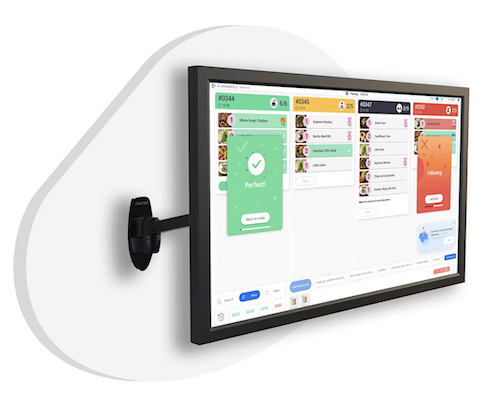
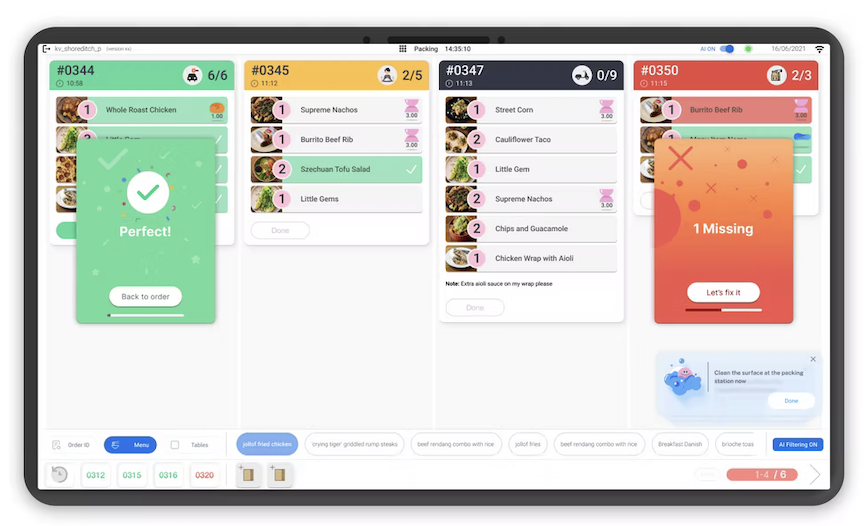
The wall-mounted Packing dashboard on its real bracket, angled into the kitchen, showing the four-order surface with a Perfect! confirmation and a 1 Missing recovery card mid-shift.
— Product

Packing Order Accuracy — an AI assistant for the line.

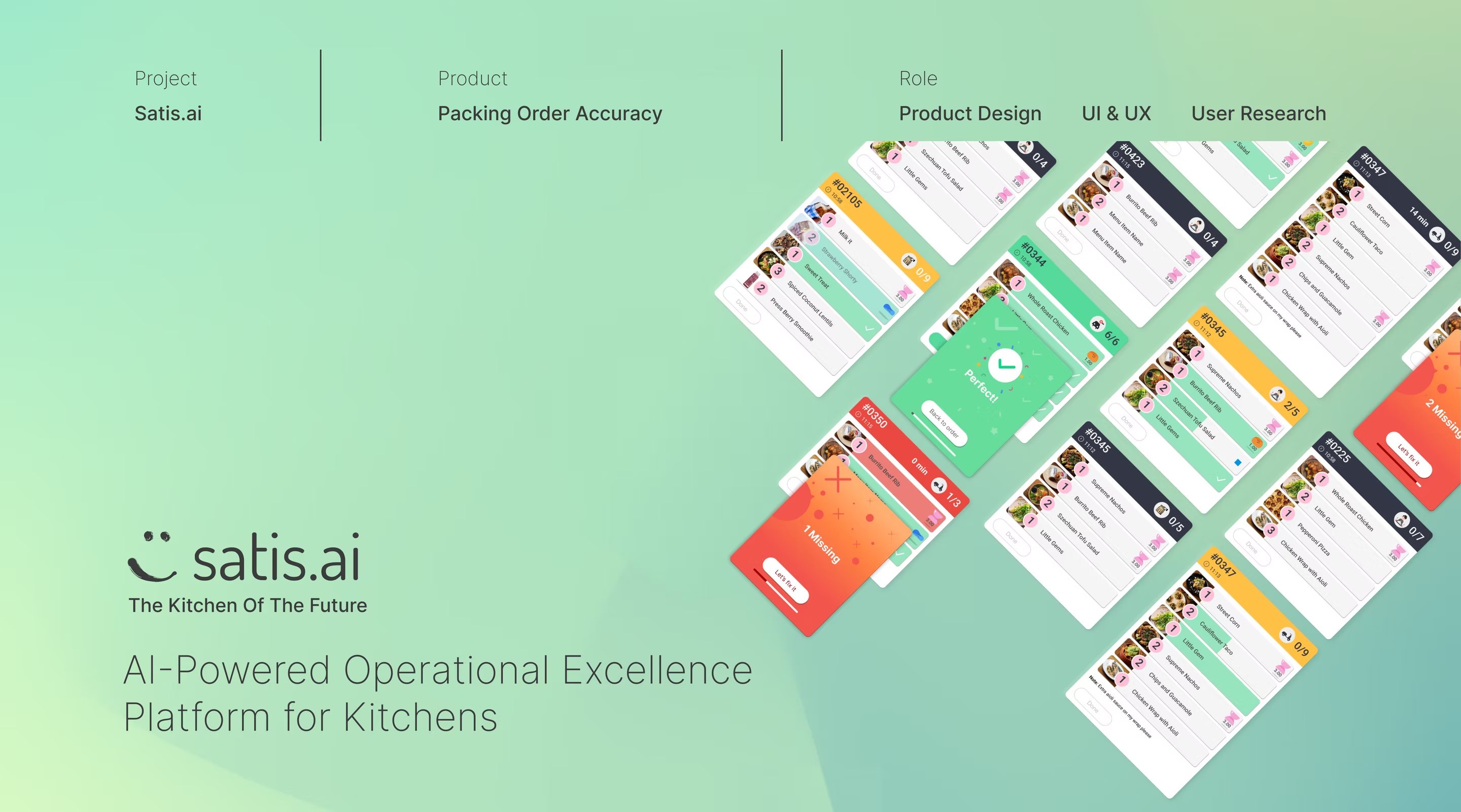
The SATIS.AI Kitchen Intelligence Platform identifies issues via cameras and communicates them to staff through interactive screens, in real time. Packing Order Accuracy is the AI assistant for the packing station — reducing packing time while increasing accuracy by guiding employees step-by-step through the process.

ProjectSATIS.AI Kitchen Intelligence Platform
ProductPacking Order Accuracy — first MVP station
RoleProduct Design · UI & UX · User Research
SurfacesWall-mounted KDS · Tablet · Manager dashboard
— 01 / Context
Where this lived

An under-researched user group, in a barely-observable environment.

“Fast-food kitchens are one of the most overlooked applications of AI — and one of the hardest interfaces I've ever had to design for.”
Venus, internal design kickoff, 2021

SATIS.AI builds an operational platform for quick-service restaurant kitchens. A network of cameras runs continuous inference over what's happening at the counter, the frier, the prep line — turning unstructured physical activity into structured signals about timing, hygiene, food safety and staff workload.

That signal is only useful if a 19-year-old crew member, four hours into a lunch peak, with grease on their hands and a queue out the door, can act on it in under three seconds — and trust that acting won't embarrass them.

I joined as the second hire on a team of engineers and computer-vision researchers. I was the only person on the team with a design background. Everything you see in this case study — from station UI to manager dashboard to the brand — was designed end-to-end, in three years, often a few hours ahead of installation in a real kitchen in London or Atlanta.

— 02 / Discovery
A 1960s playbook meets 2020s demand

The industry's problem, before our AI's problem.

Before designing for the model, I had to make the operator pain legible — to themselves, to us, and to investors.

The food industry is still running on a 1960s playbook, in an era of customisation, delivery aggregation and brutal customer expectations. The discovery phase mapped where the new pressures land hardest: mistakes are costing kitchens. Roughly 1 in 10 orders leaving a restaurant has an issue — even today's best operators can't avoid this.

We framed the problem — refunds, churn, aggregator fees — before we framed the product. Then we picked the smallest, sharpest wedge: packing.
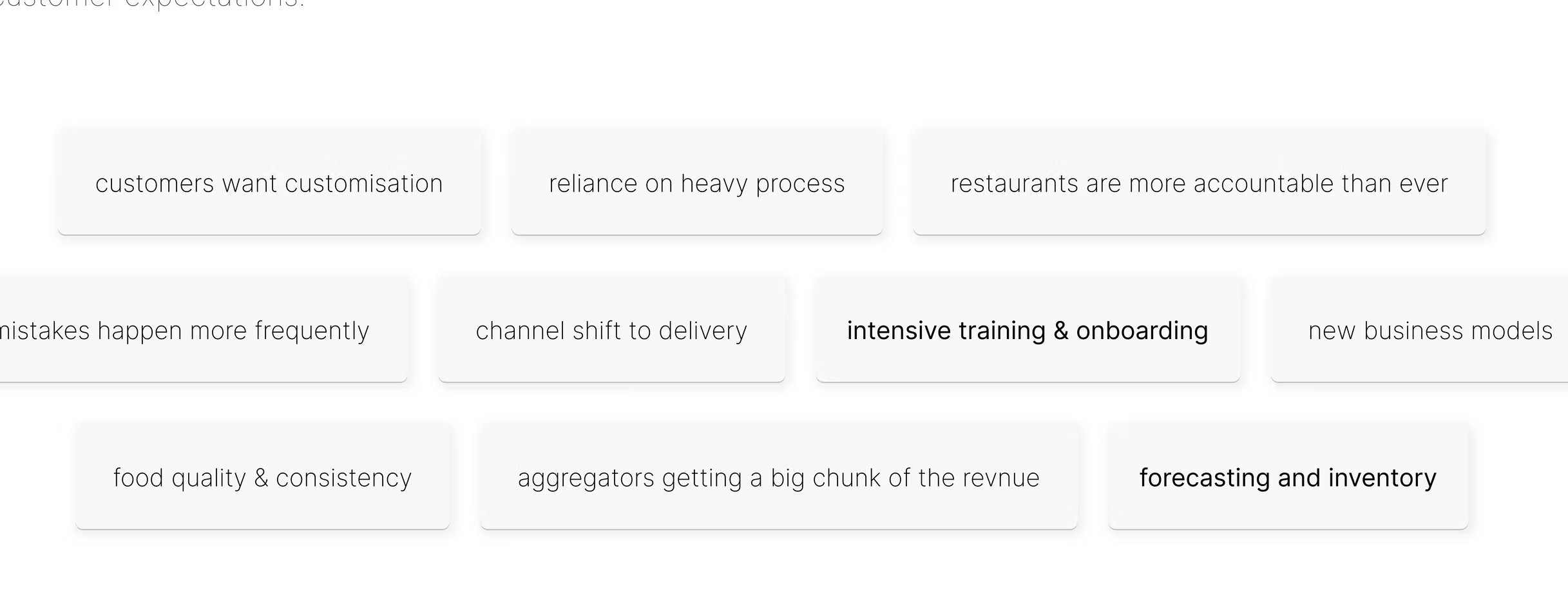
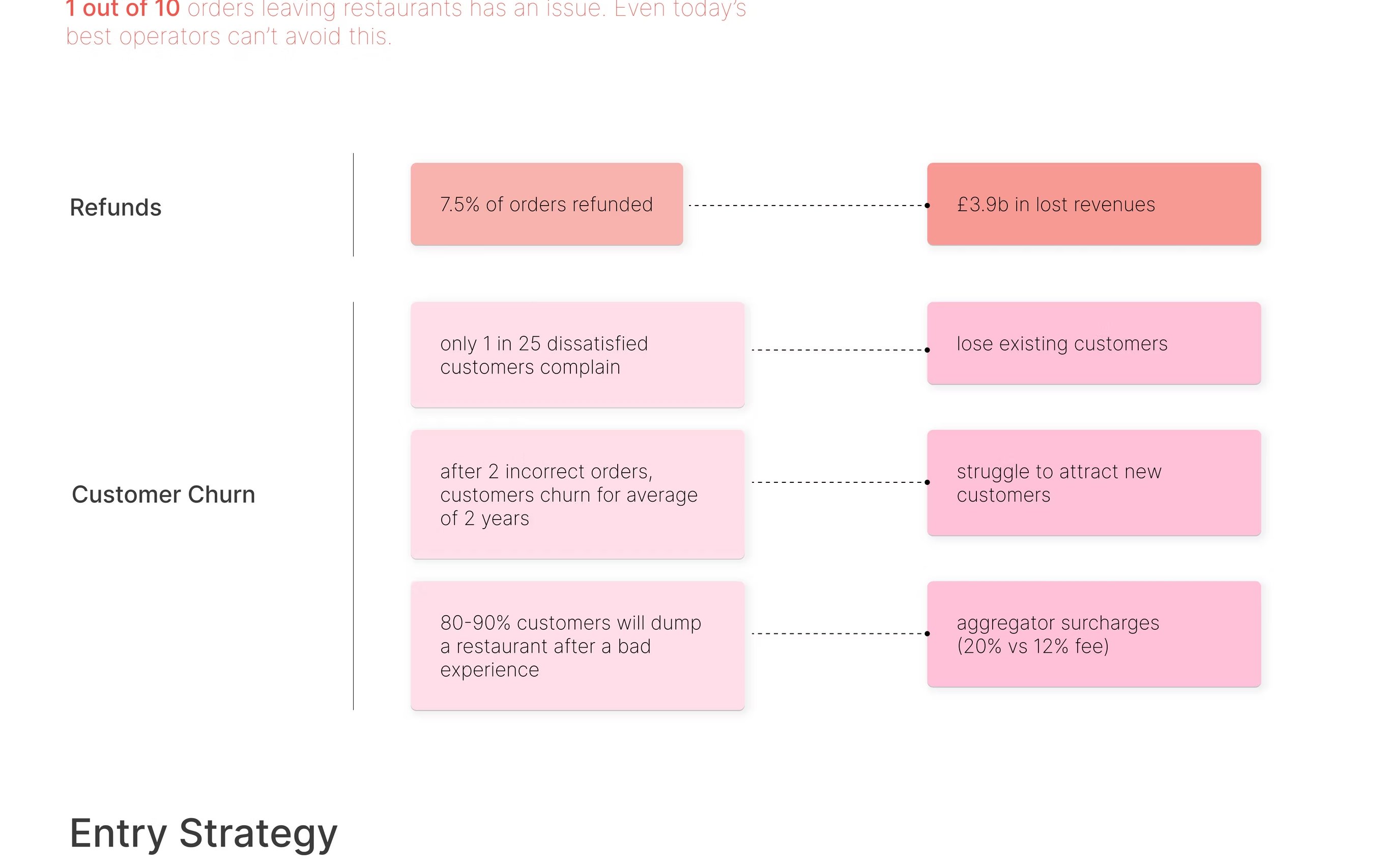
Fig. 02  ·  Industry challenges Discovery board · 2020
Word-cloud of the operator's 2020 reality
Discovery board mapping the industry challenges: customisation, reliance on heavy process, accountability, mistakes, channel shift to delivery, intensive training, new business models, food quality, aggregator fees, forecasting.
Fig. 03  ·  Refunds & churn The cost of getting it wrong
Diagram quantifying the cost of order errors: 7.5% of orders refunded, £3.9bn lost; 1 in 25 dissatisfied customers complain; 80–90% will dump a restaurant after a bad experience.
Fig. 04  ·  Entry strategy Where to land first
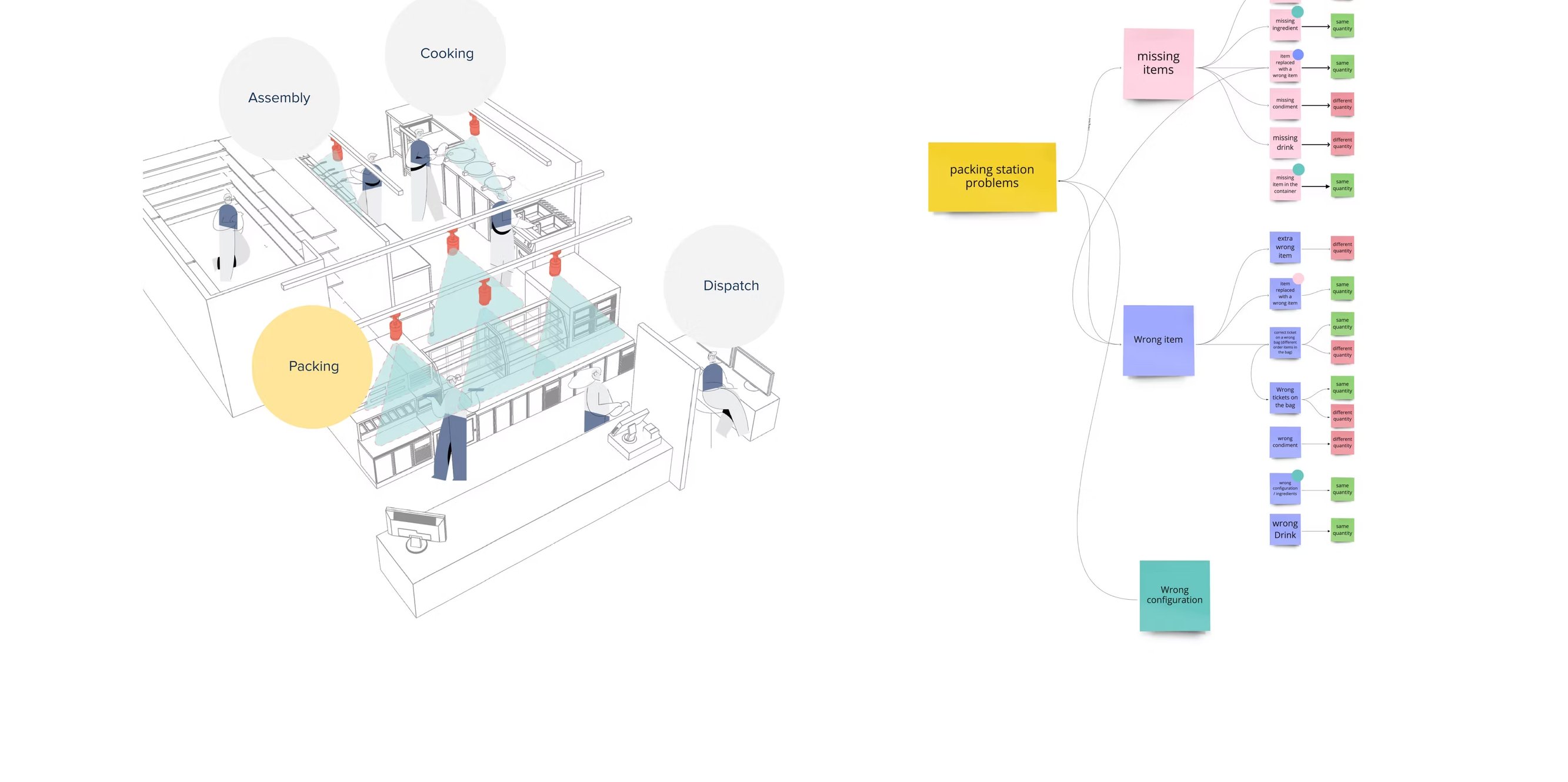
Isometric kitchen sketch identifying the packing station as the smallest wedge with the largest leverage for an MVP.
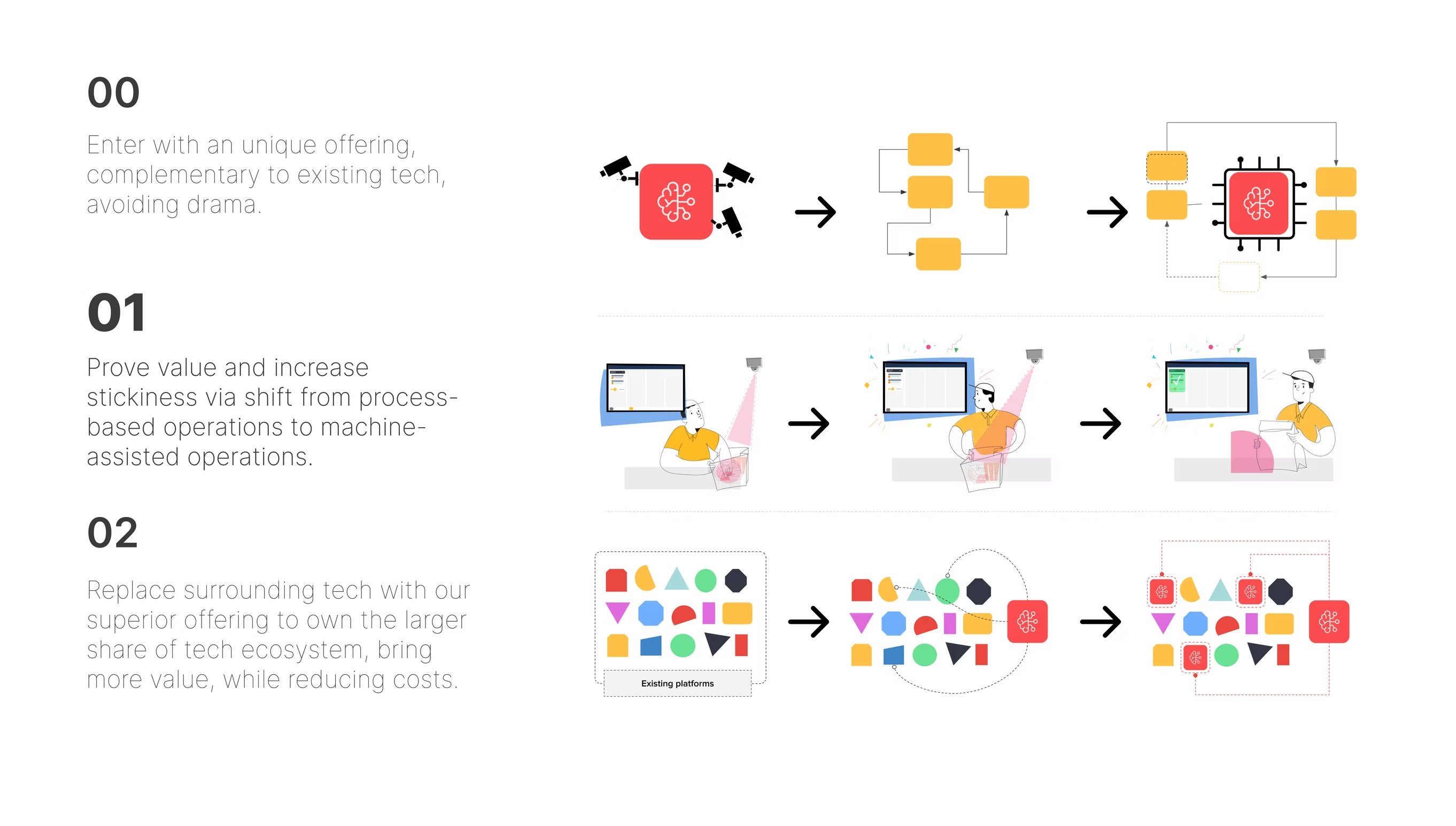
Fig. 05  ·  Three-step adoption strategy Enter as unique offering · prove value · consolidate kitchen tech
Designed to avoid drama with the operator's existing stack
Three-step adoption strategy diagram: 00 enter complementary, 01 prove stickiness, 02 replace surrounding tech ecosystem.
— 03 / Define & ideate
Hearing the line

What the crew said, sorted into what the machine could help with.

Most of the insight came not from what staff said, but from what they did when they thought no one was looking.
↳ Field research in three kitchens · Two managers, eleven crew, three regional ops.

We interviewed managers and staff to find the cognitive aspects that led to errors. The output was a sticky-note matrix per persona — tasks on one axis, friction on the other — that fed directly into the information architecture of the product.

From there, a single mind map: every component, feature and function of the existing system, laid out in one wall, so we could see where to add the AI without breaking what already worked.
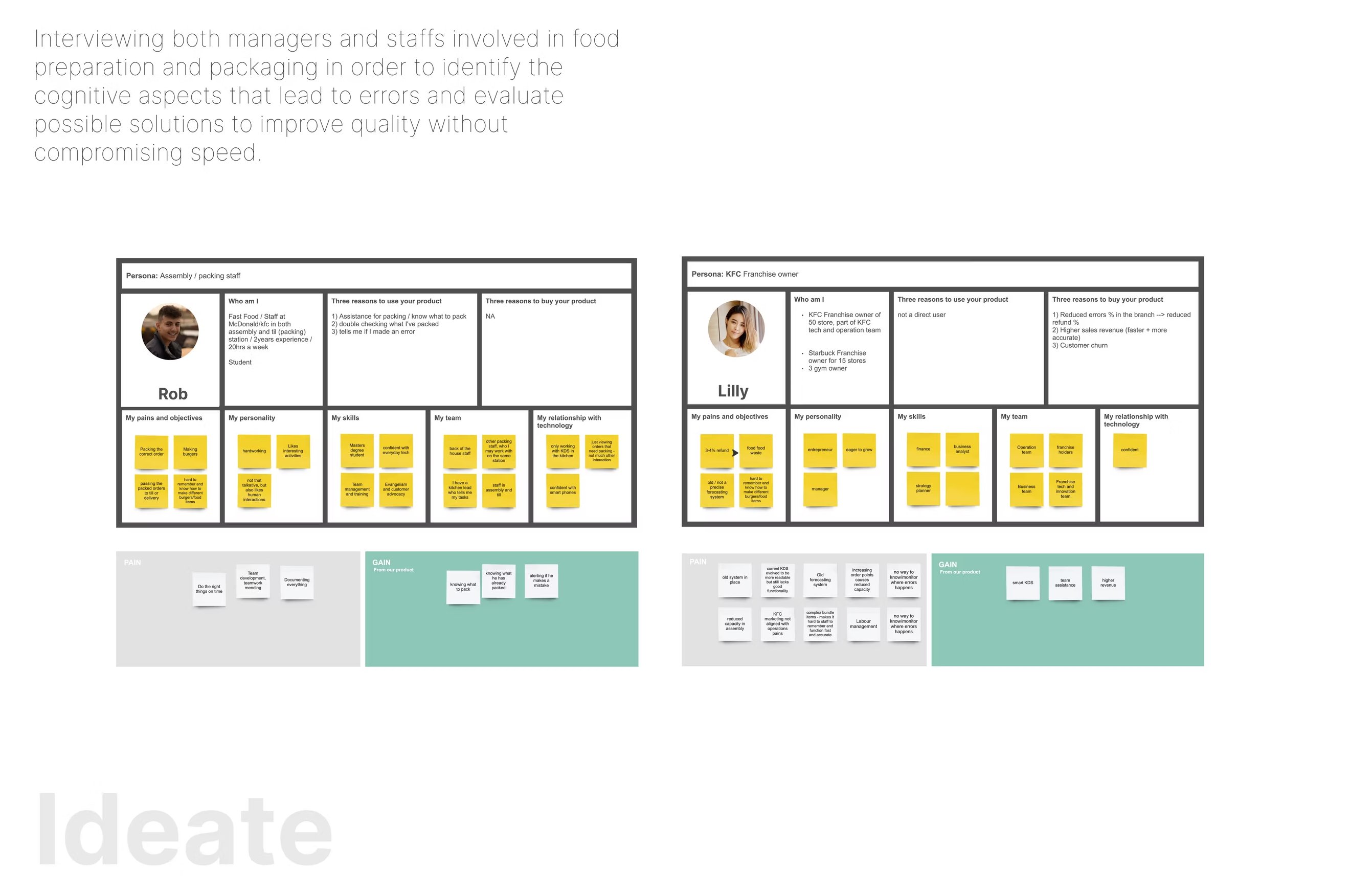
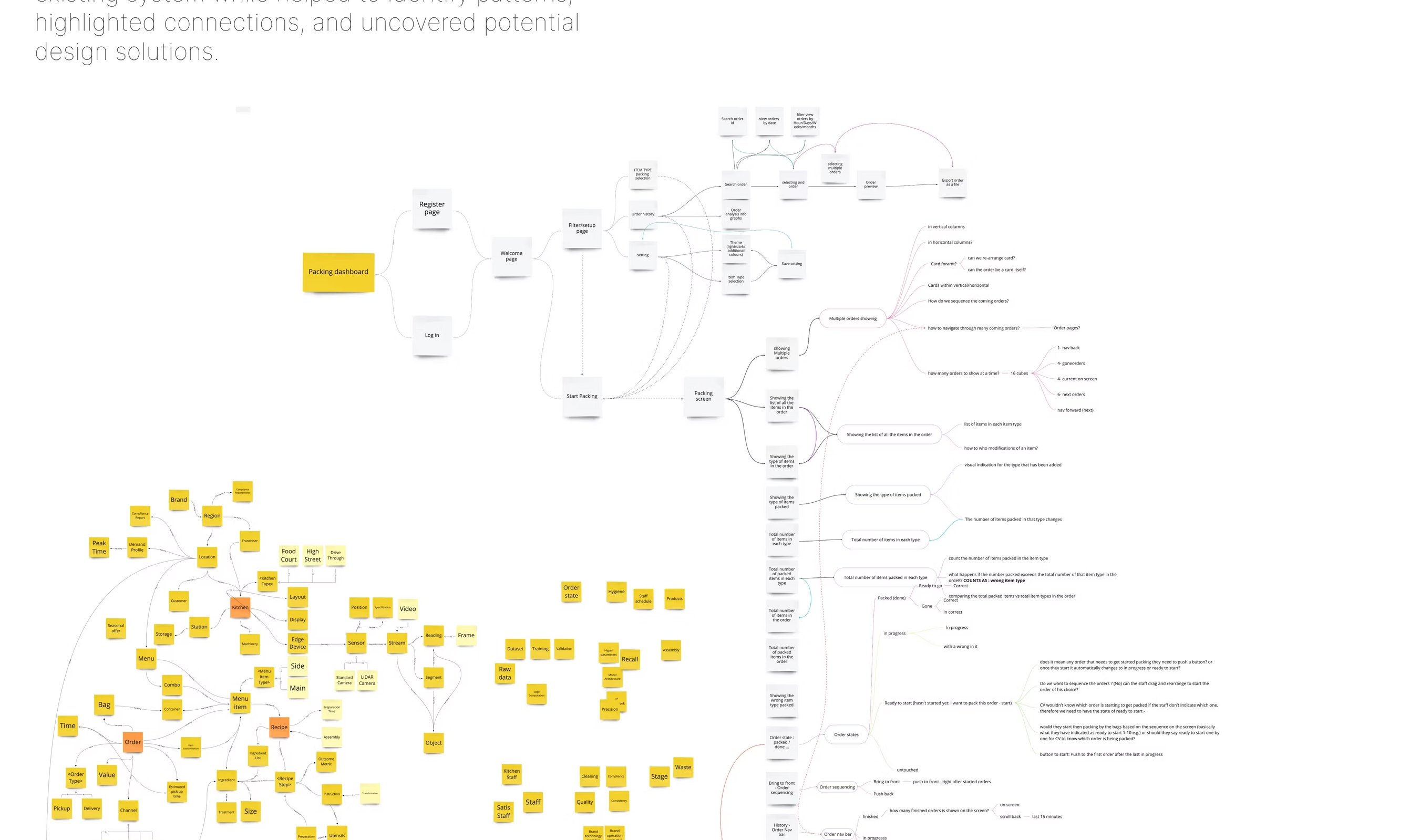
Fig. 06  ·  User interviews Manager & staff personas, sticky-noted
Two user-interview persona boards: 'Rob' (manager) and 'Lilly' (staff) with sticky notes capturing tasks and pain points.
Fig. 07  ·  Mind mapping & IA One wall, every feature
A sticky-note mind map clustering all components, features and functions of the existing kitchen system before adding AI.
— 04 / Problem
Two simultaneous problems

The human problem and the machine problem don't resolve themselves.

The interaction problem lives in the seam between what the human can't see and what the machine can't see.

Most AI design writing assumes a clean office user with time, screen real estate and patience for a tooltip. That user does not exist here. Here we have a person with seconds, no spare hand, and a real-world consequence for getting it wrong — pairing with a model that has its own gaps in perception.

The job of the design wasn't to solve either problem in isolation. It was to design the conversation between them.

The human problem

What the person needs from the system

  • 01Speed. Three seconds, no second tap. Sub-second glanceability.
  • 02Dignity. A nudge shouldn't shame a worker in front of colleagues or customers.
  • 03Authority. Staff has final call. The model never decides on their behalf.
  • 04Grease tolerance. Hit targets ≥ 64 px. No precise gestures. No tiny text.
The machine problem

What the system can't reliably see

  • 01Occlusion. Bodies and equipment block half the frame at peak.
  • 02Context. A “dropped item” could be a wipe, a fall, or a planned change-over.
  • 03Confidence drift. Lighting, steam and angles produce shifting probabilities.
  • 04Latency. A 4-second-late alert is worse than no alert at all.
Fig. 08  ·  Six constraints we faced Human–machine interaction working frame
Pinned above every design review for two years

Complexity

User-friendly interfaces dealing with intricate features, multiple functionalities, and vast amounts of information.

Usability

User-friendly interfaces dealing with intricate features, multiple functionalities, and vast amounts of information, in a fast-paced environment that should have minimum amount of interactions.

Cognitive Load

Interactions should minimise cognitive load, avoiding overwhelming users with excessive information or complex tasks. Striking the right balance between providing necessary information and preventing information overload is crucial for a positive user experience.

Feedback and Communication

AI should provide clear feedback to users, ensuring that users understand the status, progress, and outcomes of their interactions. Establishing effective communication channels is vital for building trust and enhancing user satisfaction.

Human Error and Recovery

Designing systems that can handle and recover from human errors is essential. AI should be able to detect errors, provide appropriate feedback, and guide users towards recovery options to minimise frustration and mitigate potential risks.

Privacy

Human-machine interaction raises ethical questions, such as privacy, data security, and automation's impact on employment. We addressed these concerns ensuring that design is aligned with ethical principles, societal values, and legal regulations.

— 05 / Flow
Three loops, three time-scales

Designing the conversation, end to end.

Each loop has a different user, a different latency budget, and a different relationship to AI confidence.
↳ Designed across three personas: station crew, manager, regional ops.

We mapped the operational day as three nested loops — not three separate products. The station crew lives in seconds. The manager lives in shifts. The regional operator lives in weeks. Every signal the model produced had to travel through all three with the right amount of context dropped or added at each layer.

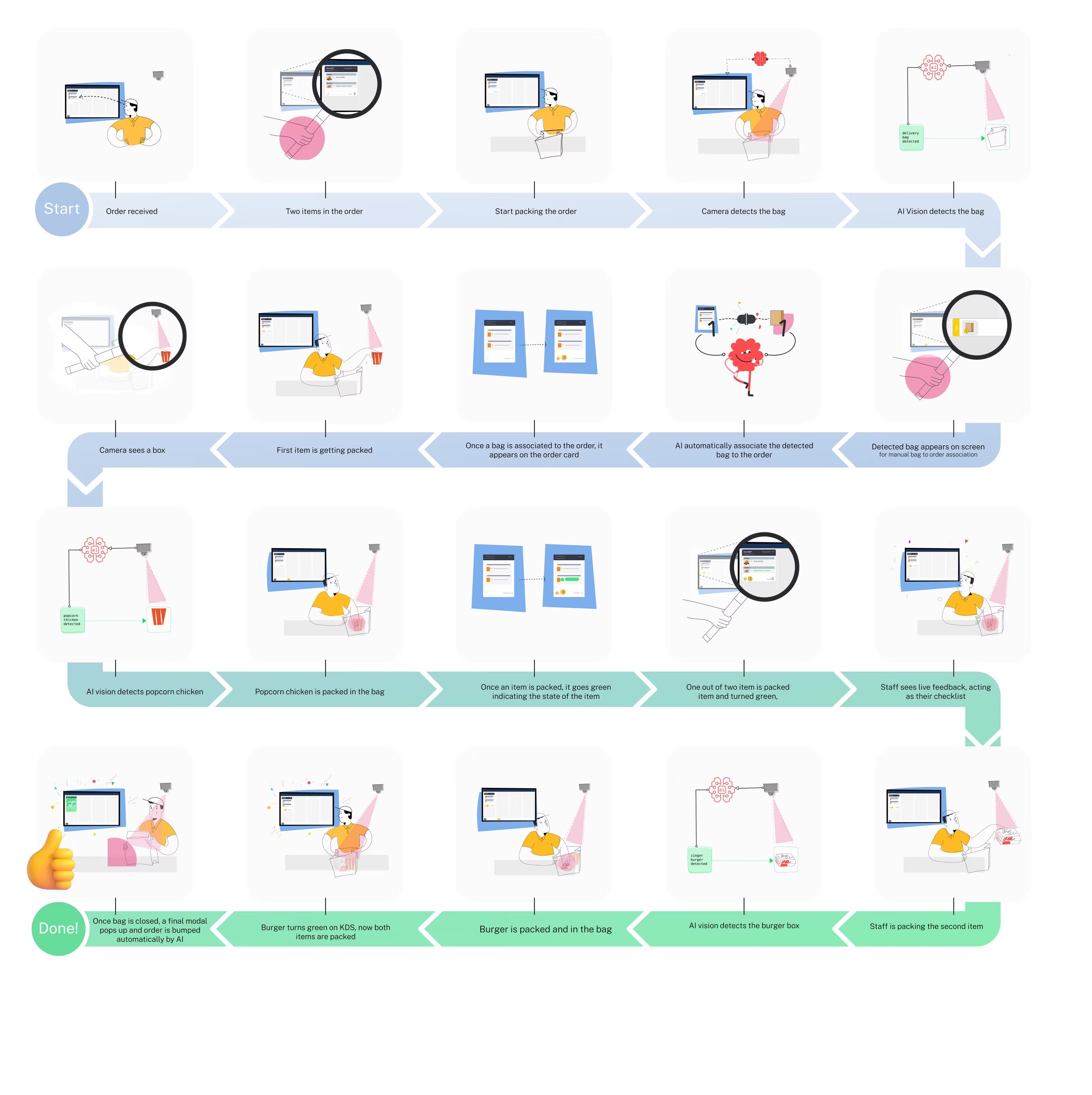
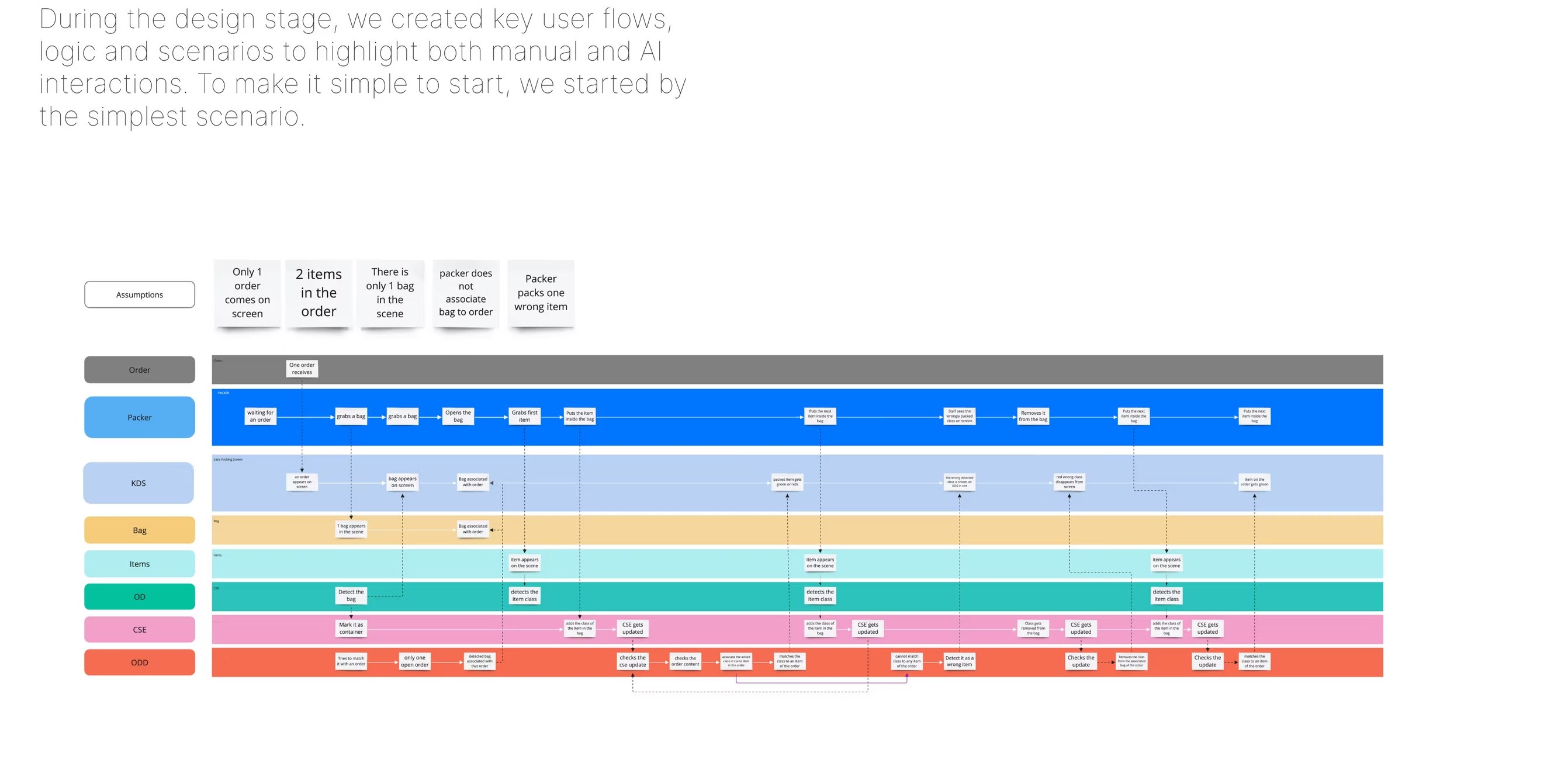
Below: the loop the station crew lives in — where humans and AI most directly meet — followed by a visual user-flow over the packing station's entire lifecycle.

Fig. 09 — Station loop · 0–3 sec budget ↻ Continuous
System · 01
Detect

CV pipeline observes the line. Continuous inference at ~7 fps.

Cameras · model
System · 02
Score

Event scored against confidence, history and shift context.

Inference layer
Surface · 03
Suggest

Glanceable card. Confidence visible. Source visible. Never an order.

Station screen
Human · 04
Decide

Crew confirms, dismisses or ignores. One tap. Two seconds.

Crew member
System · 05
Learn

Outcome feeds the manager loop and the confidence model.
Insight pipeline
System / AI Human / surface ↻ Loop closes back to detect.
Fig. 10  ·  User-flow swimlanes Manual & AI interactions, side by side
A swimlane user-flow diagram showing manual and AI interactions across the simplest packing scenario.
Fig. 11  ·  Visual user flow The packing station, end to end
An illustrated visual user flow across the entire packing-station journey.
— 06 / Design
The Kitchen Display System

One surface, five stations, four orders on screen at a time.

Traditional KDS show up to 20 orders. We capped ours at four — the rest of the design followed from that one decision.
↳ Kitchens need a KDS with different capabilities at every station. MVP shipped Packing.

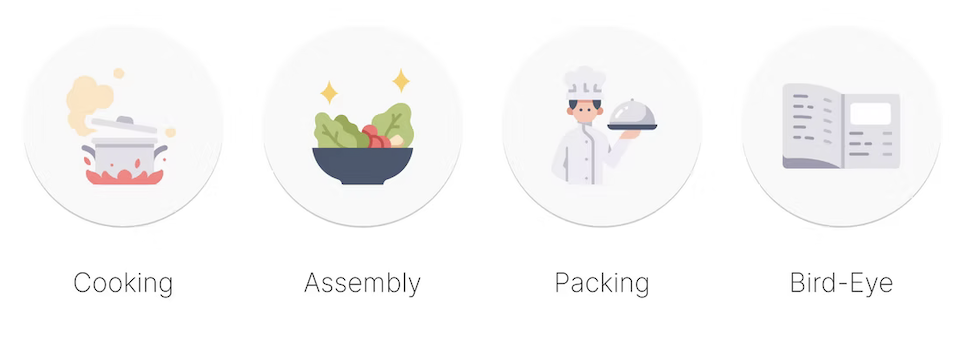
The Kitchen Display System is the spine of the product. It opens with a station selector — Cooking, Assembly, Packing, Bird-Eye, All-Day — so the same hardware adapts to the crew member who walks up to it. Packing was the MVP.

To reduce cognitive load we limited the number of displayed orders to four at a time, instead of the traditional twenty. Everything you see next — the order card, its five states, the icon set — is built on top of that single decision.
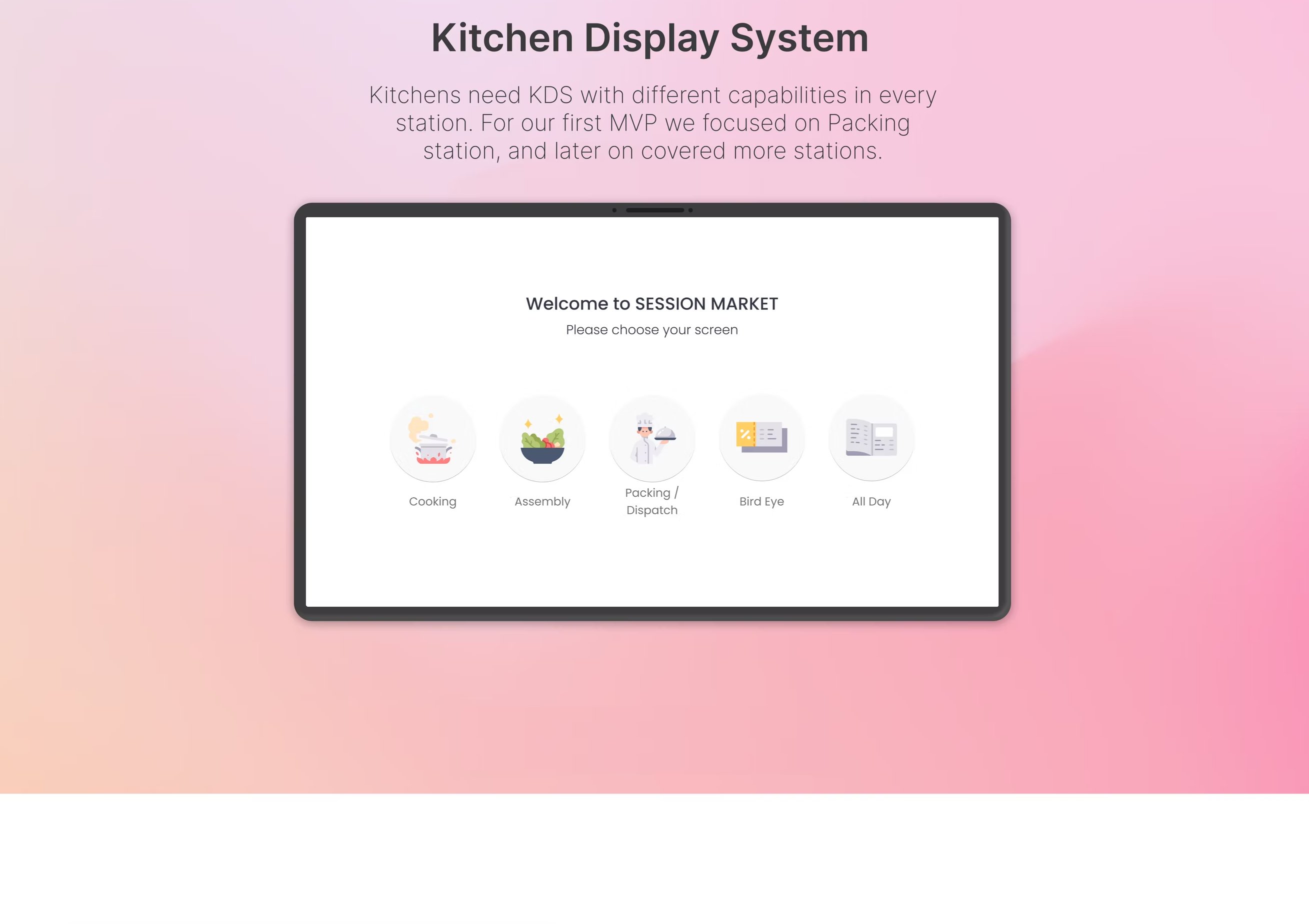
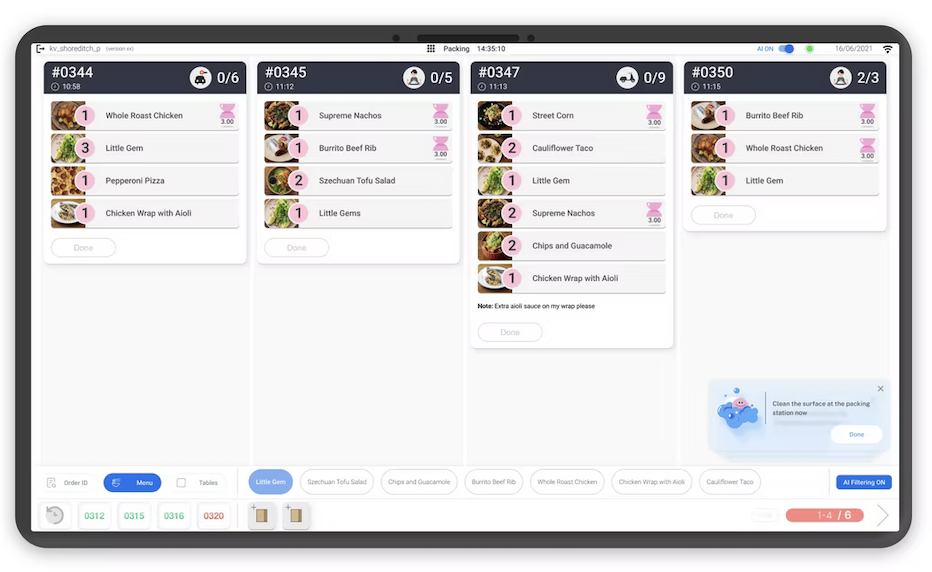
Fig. 12  ·  Kitchen Display System Welcome screen · station selection
Five stations · one hardware · five capabilities
The Kitchen Display System welcome screen on a wall-mounted tablet: a 'Welcome to SESSION MARKET — Please choose your screen' panel with five circular icons for Cooking, Assembly, Packing / Dispatch, Bird Eye and All Day.
Fig. 13  ·  Packing dashboard, in deployment Tablet · station kv_shoreditch_p · 14:35:10 · 16/06/2021
4 orders · 1 nudge · AI Filtering ON
A real deployment screenshot of the Packing dashboard on a tablet: four order cards (#0344 with 0/6 items, #0345 0/5, #0347 0/9, #0350 2/3), each item showing quantity, name and an item-quality icon (pink waiting hourglass, score 3.00). The bottom-right floats a friendly nudge card with the cleaning character: ‘Clean the surface at the packing station now — Done.’ The bottom toolbar shows order-channel chips, a Menu/Tables toggle and the AI Filtering ON toggle.
Read at a glance: four orders, one AI nudge, one filter state. Every other state lives one tap away. ↳ Real install · 2021
Fig. 14  ·  States, in flight Four orders, four conversations, one screen
Perfect · In progress · Yet to start · 1 Missing
The same Packing dashboard mid-shift, now with state overlays. Order #0344 (green, 6/6) shows a ‘Perfect!’ confirmation card with a Back-to-order button. Order #0345 (yellow, 2/5) is in active progress with a highlighted item. Order #0347 (navy, 0/9) is yet to start, listing items and a note. Order #0350 (red, 2/3) shows a ‘1 Missing’ recovery card with a Let’s-fix-it button. The cleaning-nudge card is still visible in the bottom-right.
Same screen as Fig. 13, three minutes later. Each header colour is a different state of the same conversation. ↳ See Fig. 15 for the underlying design-system key.
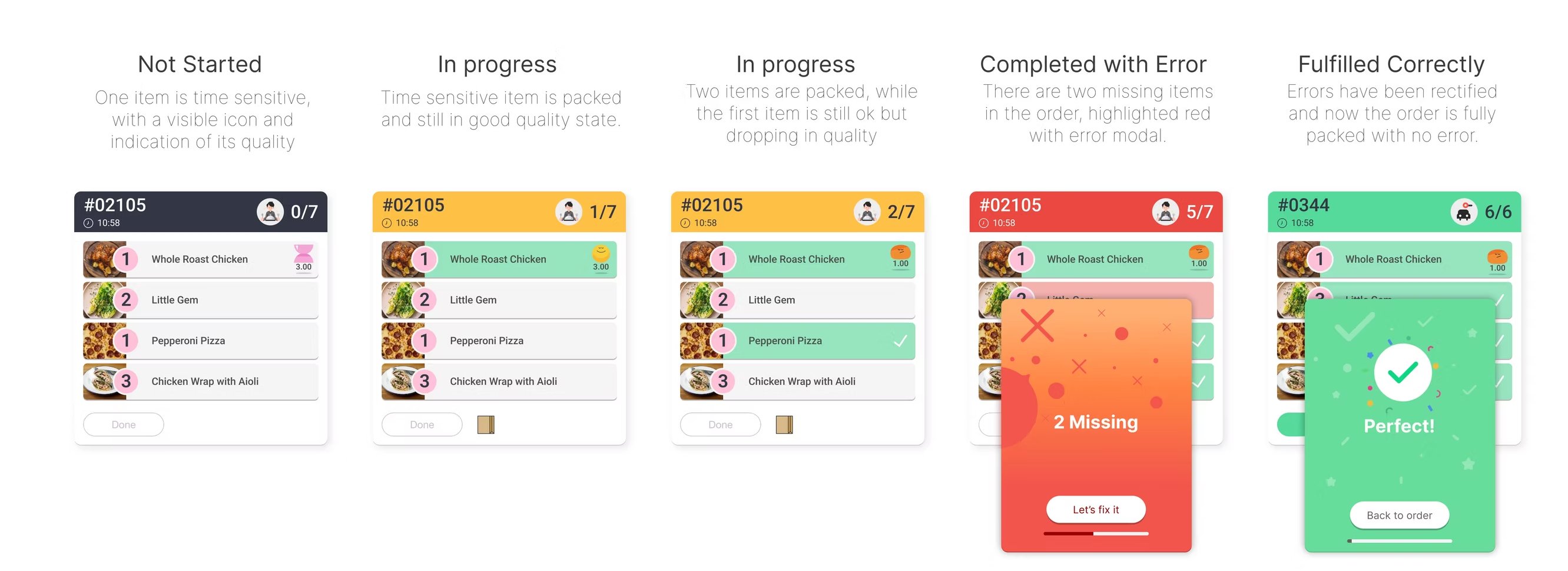
Fig. 15  ·  Five card states From “Not started” to “Fulfilled correctly”
Each state is a different conversation with the crew
The five states of the packing order card laid out left to right: Not Started, In Progress (quality good), In Progress (quality dropping), Completed with Error (with red overlay), Fulfilled Correctly (green Perfect screen).
State 04 — Completed with Error — pops a modal before the bag leaves the station, giving the crew a recovery moment. ↳ One tap to fix
— Pattern 01

Suggest, don't instruct.

Every prompt is phrased as “Looks like…” with a clear way to dismiss. The model is offering its view, not issuing orders.

— Pattern 02

Header drives state.

Card color & header copy carry status. Crew read state at three metres — same speed as reading a traffic light.

— Pattern 03

Recovery before the bag.

A missing-item alert is a modal, not a notification — staff has to acknowledge before the order can advance.

— Pattern 04

Cap the load.

Never more than four orders on screen. Older orders get bumped off; "All-Day" view is for the manager, not the line.

— Pattern 05

Dismiss is data.

A dismissal is never a dead-end — it enters the manager loop as a tuning signal and tunes confidence per station.

— Pattern 06

Quiet by default.

No sounds, no flashes. Visual priority shifts within the screen. A kitchen has enough noise without us adding to it.

— 07 / Iconography
A custom system, hand-drawn

An icon pack that talks to a 19-year-old, not a designer.

Off-the-shelf icons treat staff as technicians. We needed icons that looked like the kitchen, not like a settings panel.

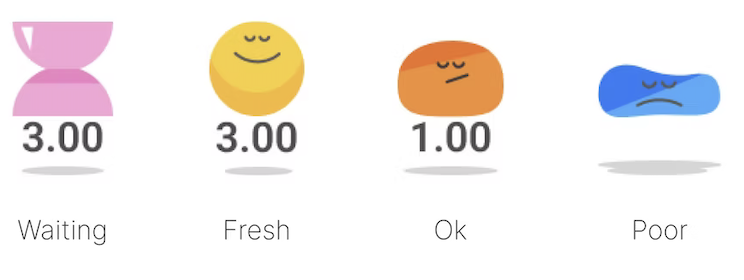
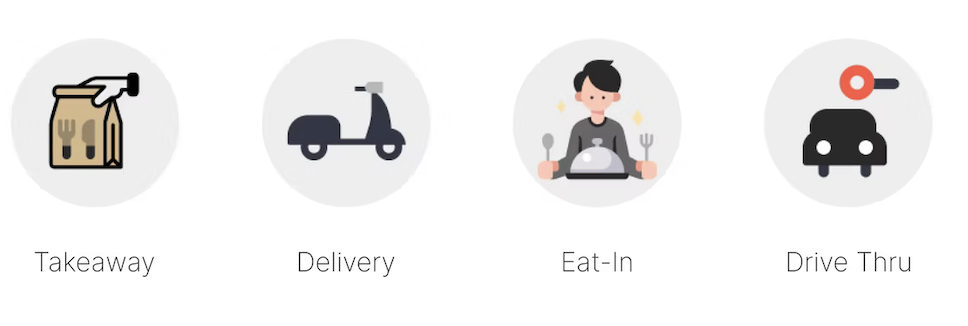
I designed a custom icon pack covering every category and capability on the KDS — item quality, nudges, order channels, station-selection. The brief was clarity at three metres, recognition under one second, no fine detail, no jargon.

Friendly characters showed up where the system needed warmth (nudges, fresh items). Flatter, more functional symbols showed up where the system needed authority (order channels, station selection).
— Set 01 Item quality
Item quality
Item quality icons labelled left to right: Waiting (3.00, pink hourglass), Fresh (3.00, yellow smile), Ok (1.00, orange neutral), Poor (blue droplet, sad).
— Set 02 Order channel
Order channel
Order channel icons labelled left to right: Takeaway (paper bag), Delivery (scooter), Eat-In (server with plate), Drive Thru (car at a window).
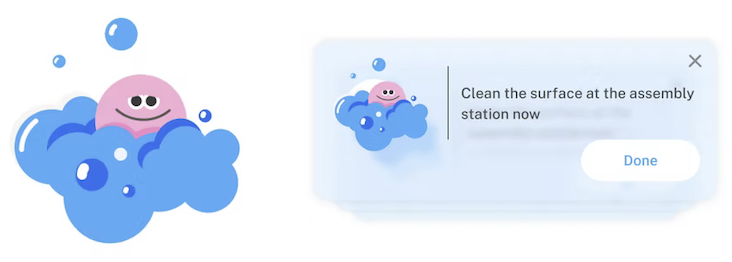
— Set 03 Nudge characters
Nudge characters
Left: a friendly pink character peeking out of a blue cloud of bubbles. Right: the same character used inside an in-product nudge card that reads ‘Clean the surface at the assembly station now’ with a Done button.
— Set 04 Screen selection
Screen selection
Screen-selection icons labelled left to right: Cooking (steaming pot on a flame), Assembly (bowl with sparkles), Packing (chef holding a covered plate), Bird-Eye (open notebook).
— 08 / In context
Final form

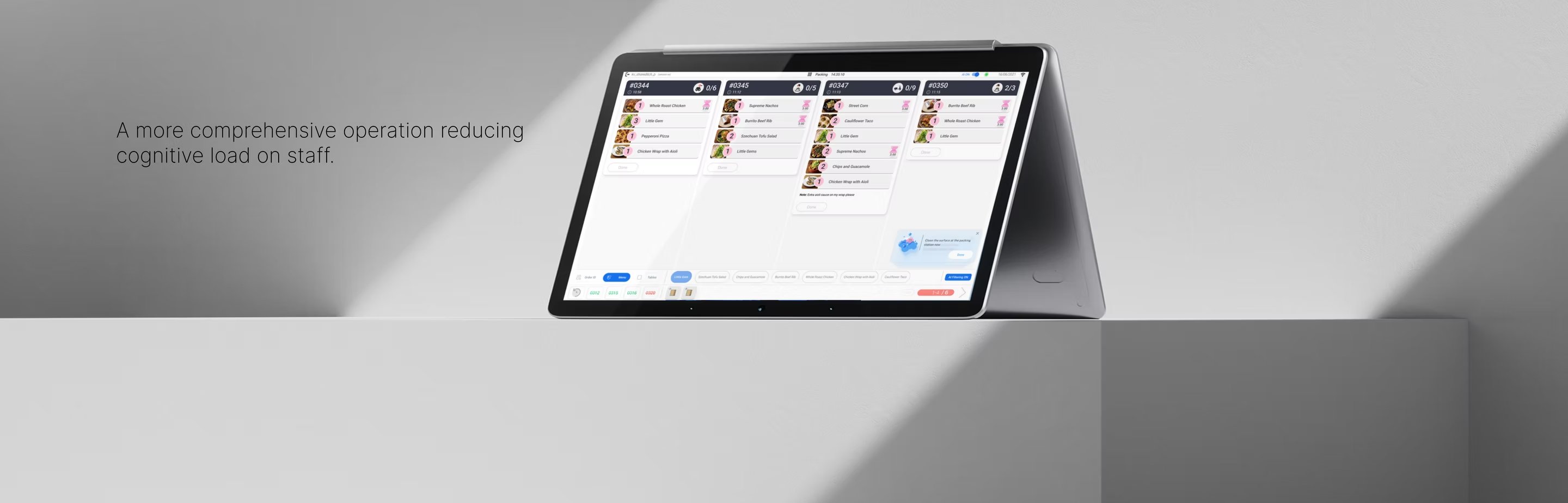
A more comprehensive operation, with less on the crew's head.

Fig. 16  ·  Tablet, on the line. Reducing cognitive load on staff
Photo · installed kitchen · 2023
The tablet form-factor of Packing Order Accuracy, sitting on a counter in a working kitchen.
— 09 / Outcome
Three years, two markets

What happened when these landed in real kitchens.

The headline wasn't accuracy of the model. It was uptake of the model by people who hadn't asked for it.
↳ Numbers approximate, anonymised, representative of platform-wide signal at exit.

By 2023 the platform was live across both UK and US sites, with multiple operators. The work I'm most proud of isn't any single screen — it's how the patterns above changed the shape of the conversations the company was able to have with operators, investors and crews.

I also led design of the manager dashboard, the regional operator view, and contributed to the SATIS.AI design system, brand and investment materials — effectively running the design function single-handed for two and a half years.

— Adoption
3.2×
More daily interactions per crew member after the “suggest, don't instruct” rewrite.
— Trust
41%
Dismissed-as-wrong rate, once confidence and source were made visible at the station.
— Coverage
2 markets
UK & US deployments across multiple QSR operators between 2021–2023.
— Function
1 designer
Sole design lead across product, brand, dashboard and investment decks.
— 10 / What this taught me
About designing human–AI interaction

What it taught me about human–AI interaction.

— Lesson 01

Trust is made of small details, not big promises.

Confidence bands, source-frame reveals, dismiss-as-data — these tiny patterns moved more trust than any marketing copy ever could. The interface is the trust layer.

— Lesson 02

The AI's gaps need a voice, not a hideaway.

Pretending the model is confident when it isn't costs you the user. Pretending it can see everything when it can't costs you the operator. Legibility is the only honest move.

— Lesson 03

Hierarchy of time beats hierarchy of information.

The crew, the manager and the operator live in different time-scales. Designing for that hierarchy — rather than for one universal “dashboard” — let the same model serve three audiences.

— Lesson 04

If they didn't ask for it, earn it.

The hardest UX problem in applied AI isn't novelty — it's consent. When users didn't pick the tool, every interaction is a re-pitch. Quietness, dignity and usefulness are the reply.

— 11 / Continue ↳ Next in series